Timeslice
Your coding time never leaves your machine.
VS Code extension Available now — direct download levelbrook.timeslice v1.0.0
Status — Timeslice 1.0.0
Built, tested and packaged as a .vsix, and you can download and install it right now from this page. It is not on the VS Code Marketplace or Open VSX yet — that listing is pending a publisher account, and nothing about it changes the software you get here.
Install it with Extensions: Install from VSIX… from the VS Code command palette (Cmd/Ctrl + Shift + P), or from a terminal with code --install-extension timeslice-1.0.0.vsix. It works the same way in Cursor, Windsurf and VSCodium.
Why this exists
The category leader has 23,086,690 installs and a business model that reads: free extension, paid service, your keystroke metadata on our servers. Two complaints come up again and again in its public reviews:
“It inflates my coding time… Wrote just a line of comment. My coding time went from 8 mins to 14 mins.”
Marketplace review of the incumbent
“The extension is free, but not the service. You have to pay $6 for a basic plan.”
Marketplace review of the incumbent
The privacy-respecting alternative exists, but it asks you to run your own server. Timeslice is the third option: all local, honest arithmetic, and useful forever without paying anyone.
How Timeslice counts your time — the whole algorithm, in public
This is the part most trackers will not show you, and it is the reason numbers get inflated. Timeslice credits time only for the measured gap between two real activity events — a keystroke, a cursor move, a save, a debug step, a terminal interaction, or the window regaining focus. For two consecutive events A then B:
gap = monotonic_clock(B) - monotonic_clock(A)

gap > idleTimeout       ->  credit 0, the session ends here     (you were away)
the wall clock jumped   ->  credit 0, the session ends here     (NTP / sleep / timezone)
otherwise               ->  credit min(gap, maxGapCredit) to A's file, project and branch
After the final event of a session, tailCreditSeconds is added — and it
defaults to zero, because after your last keystroke there is no evidence
you were still working. Defaults: idleTimeoutSeconds: 120,
maxGapCreditSeconds: 120, tailCreditSeconds: 0.
| What you did | Wall clock | Timeslice credits |
|---|---|---|
| Typed a one-line comment, then walked away | 6 minutes | ~6 seconds |
| Left the editor open on a file overnight | 9 hours | 0 |
| Coded solidly with pauses under 2 minutes | 50 minutes | 50 minutes |
| Coded 50 min, took a 15 min break, coded 45 min | 1h 50m | 1h 35m |
Three guarantees fall out of that design. Durations come from a monotonic
clock, so an NTP correction, a laptop that slept for eight hours or a
daylight-saving transition cannot add a single second to your total. Credit is attributed
to the earlier context — when you jump from a.ts to
b.ts, the gap belongs to a.ts, the last place there is evidence
you were working. And losing window focus stops the count immediately.
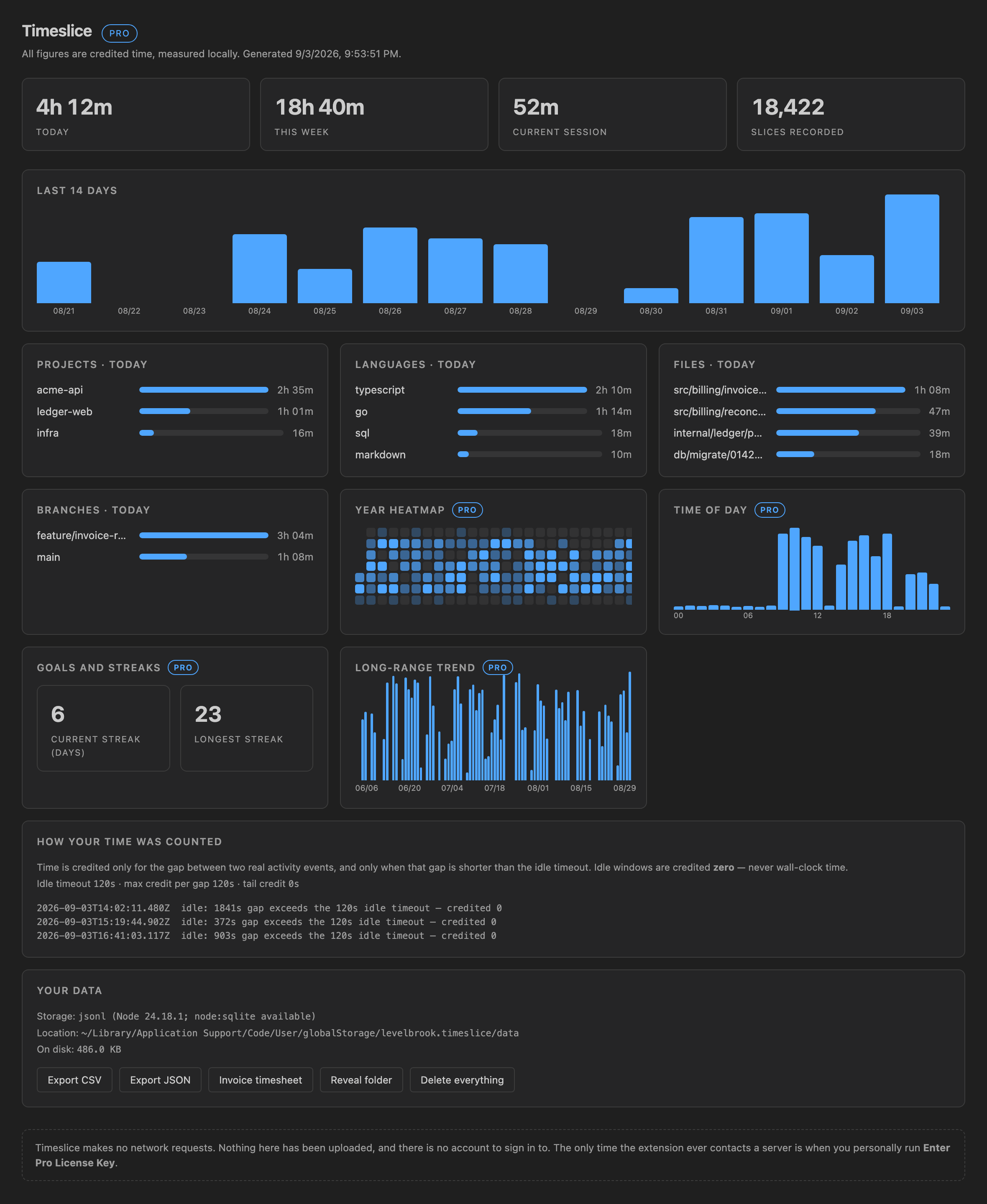
Run Timeslice: Explain How Time Was Counted at any point and the extension prints this algorithm with your own settings substituted in, followed by every idle break and capped gap it recorded in that session. The numbers are auditable, not a black box.
Free forever
Everything in this list is free, permanently, and is not a trial of anything.
- Honest tracking with the configurable idle model above.
- Per-project, per-language, per-file and per-branch breakdowns.
- Status bar showing today / this week / current session, plus a dashboard.
- 30 days of dashboard history and a 14-day activity chart.
- Full export of your entire history to CSV and JSON — all of it, not a 30-day window. Your own data is never held back from you.
- One-click delete everything.
- Multi-root workspaces, and several VS Code windows writing at once.
- Zero network calls.
Pro
| Feature | Free | Pro |
|---|---|---|
| Honest idle-aware tracking | Yes | Yes |
| Project / language / file / branch breakdowns | Yes | Yes |
| Status bar and dashboard | Yes | Yes |
| Full CSV + JSON export of all history | Yes | Yes |
| Delete everything | Yes | Yes |
| Dashboard history | 30 days | Unlimited |
| Year heatmap calendar | — | Yes |
| Time-of-day patterns | — | Yes |
| Goals and streaks | — | Yes |
| Invoice-ready timesheet (CSV and printable HTML) | — | Yes |
| Weekly report export (HTML, prints to PDF) | — | Yes |
| Multi-machine merge via your own sync folder | — | Yes |
The Pro split follows one rule: nothing that was free stays free only until you look away. Pro adds a power layer; it never takes a feature back, and it never withholds your own data.
Free
$0 · permanent
Not a trial. Not a countdown. The free tier listed above never moves behind a paywall — that is the whole point of the pledge.
Read the pledgePro — lifetime
$39 once
- Every Pro feature, on every machine you own
- One year of updates included; the version you bought keeps working forever
- No account and no email address required to use it
Pro — monthly
$5 / month
- The same Pro feature set
- Cancel at any time from the Stripe receipt
A 14-day trial starts the first time you use a Pro feature. No account, no email address, no card and no request to any server. Payment is handled by Stripe; we never see your card details. Your entitlement is an Ed25519-signed token that is verified offline, so Pro keeps working when you do not have a network.
Already bought it and lost the key? Recover your licence key.
Privacy, stated so you can check it
- The free tier makes no network requests at all. The only time Timeslice ever contacts a server is when you personally run Timeslice: Enter Pro License Key, which sends the key you typed and an anonymous install id, and nothing else.
- No telemetry, no analytics, no crash reporting, no “anonymous usage statistics”. There is no opt-out setting because there is nothing to opt out of.
- No account, no email address — not even for the trial.
- Your history is append-only JSONL in your own home directory. You can read it, grep it, export it and delete it.
What we have not verified
Honesty cuts both ways, so here is what is not proven yet. Timeslice was built and tested on macOS on Apple silicon; Windows and Linux have not been exercised, and neither have Remote SSH, WSL, Dev Containers or Codespaces — the code is written for them, but nothing platform-specific has been run. The multi-machine sync merge is copy-only and idempotent by construction but has not been run across two real machines. See how we talk about what we ship.